OpsRamp offers comprehensive Oracle Database Monitoring to help you track the performance and availability of your Oracle database environment. This monitoring capability provides ready-to-use metrics that enable you to quickly assess the health of your Oracle servers.
Once logged in to the OpsRamp portal, you can view real-time status updates and performance metrics related to your Oracle Database instances.
To explore the complete list of available OracleDB metrics in OpsRamp, refer to Opsramp DB
OpsRamp collects Oracle database metrics by executing queries on target Oracle servers using JDBC connections via a Gateway. This setup allows efficient and secure data collection while minimizing the impact on your database environment.
| Integration Name | Supported Collector Type | Supported Target Versions | Monitoring Protocol |
|---|---|---|---|
| Oracle Database | Gateway | 19.3.0.0.0 | JDBC |
Introduction
The objective of this document is to help users, who are completely new, to create query based (Oracle) custom monitors development in the OpsRamp. This document provides a complete user guide to implement Oracle query based metrics and create monitors and templates. Also explain end to end along with Troubleshooting steps and FAQs which are related to OracleDB Monitoring.
Note
The Oracle Query-Based Monitoring is completely related to Classic Application Monitoring and does not pertain to the SDK app.What is Oracle Database Monitoring?
OpsRamp provides Oracle Database Monitoring, which offers readily available performance metrics that enable users to effortlessly visualize the health and availability of their Oracle Database environment. With a simple login to the OpsRamp portal, users can access and view the status updates and performance metrics specific to Oracle servers.
For all available OracleDB metrics in OpsRamp, refer to Oracle DB.
OpsRamp collects Oracle database metrics by executing queries on target Oracle servers using JDBC connections via a Gateway. This setup allows efficient and secure data collection while minimizing the impact on your database environment.
| Integration Name | Supported Collector Type | Supported Target Versions | Monitoring Protocol |
|---|---|---|---|
| Oracle Database | Gateway | 19.3.0.0.0 | JDBC |
Introduction
The objective of this document is to help users, who are completely new, to create query based (Oracle) custom monitors development in the OpsRamp. This document provides a complete user guide to implement Oracle query based metrics and create monitors and templates. Also explain end to end along with Troubleshooting steps and FAQs which are related to OracleDB Monitoring.
Note
The Oracle Query-Based Monitoring is completely related to Classic Application Monitoring and does not pertain to the SDK app.What is Oracle Database Monitoring?
OpsRamp provides Oracle Database Monitoring, which offers readily available performance metrics that enable users to effortlessly visualize the health and availability of their Oracle Database environment. With a simple login to the OpsRamp portal, users can access and view the status updates and performance metrics specific to Oracle servers.
For all available OracleDB metrics in OpsRamp, refer to Oracle DB.
How Oracle Database Monitoring works
- Database and port(1521) can be accessed by the gateway.
- A gateway management profile mapped to a resource.
- Create credentials with type Database before assigning a template to a resource. The Port, Connection Time-out, and Is Secure values are not used to create credentials.
Setting Up Credentials
To enable Oracle Database Monitoring in OpsRamp, you must create credentials of a Database type. These credentials are required before assigning a monitoring template to the resource.
- Create the credentials in OpsRamp with the type Database.
- Ensure the credentials belong to a user with the necessary database privileges.
- These credentials are used to authenticate via JDBC when querying the Oracle database.
Note
The values for Port, Connection Timeout, and Is Secure fields are not used during credential creation.Required Database Priveleges
The Oracle user associated with the credentials must have the following minimum privileges for monitoring to function correctly:
| Privilege | Description | Example |
|---|---|---|
| CONNECT | Allows the user to connect to the Oracle database. This is required before assigning additional privileges. | GRANT CONNECT TO MY_USER; |
| SELECT ANY DICTIONARY | Enables access to Oracle performance and dictionary views. This is the minimum privilege required to monitor all G2 templates. | GRANT SELECT ANY DICTIONARY TO MY_USER; |
These privileges ensure that the platform can retrieve performance and health metrics from OracleDB using the predefined templates.
Oracle DB monitoring sends alerts with specific reasons instead of generic ones. are sent for a particular instance by considering both the instance name and the monitor Name.
This provides you with the following benefits:
- Increased visibility to determine whether the issue is related to credentials, configuration, or other causes.
- Identify the exact root cause of the issue.
- Avoid repeated alert noise.
Database Discovery and Monitoring
OpsRamp supports both agent-based and agentless (gateway-based) monitoring of Oracle Database servers. This section describes how to discover OracleDB resources and prepare them for monitoring using a Gateway.
Discovery using the gateway
The OpsRamp Gateway connects to Oracle databases using the Java Database Connectivity (JDBC) API and collects performance metrics through SQL queries.
Use one of the following mechanisms to discover OracleDB servers to add them to your inventory:
- WMI
- SSH
- SNMP
Optionally, add a database server manually to the infrastructure inventory:
- Select Infrastructure and click Resources.
- Click the Settings icon on the top-right and click Add.
- On the Add Device page, enter the Device Type and any other information you want to enter.
- Click Save.
Prepare the device to start monitoring
- Associate appropriate database credentials to the discovered database.
- Assign one or more database-specific global monitors or templates on the device.
Optionally, create custom metrics or monitors using SQL queries and assign them to the database.
To track monitoring of OracleDB database in your cloud environment, see Monitoring Cloud Database using Gateway.
Oracle Query-Based Monitoring Development
How to develop & create Oracle metric
OpsRamp comes with a predefined set of Oracle metrics. However, for users who want any customization and the ability to create their own monitoring solutions, we offered UI-based support for creating Oracle metrics.
To prepare Oracle metric, Users must return max one or two fields from the query. Please follow below usecases along with examples to understand how to write queries to monitor Oracle environment.
How to Prepare an Oracle Metric Query
Example 1
Query: Select count(username) as “Number of Locked Users” from dba_users where account_status = 'LOCKED(TIMED)'.
The above query output is the count value of the number of locked users. The framework should consider the value as a metric value.
Example 2
Query: SELECT count(object_name) FROM dba_objects WHERE status = 'INVALID'
The above metric query output is the count value of the Invalid objects. Here, our framework should consider the value as metric value.
Metric with Multiple Components
If the user wants to prepare a metric query for multiple component based metrics, then the user can return to two columns from the query result. In this example, Column 1 will be considered the Component Name and Column 2 will be the Metric Value.
Example 1: To Monitor the states of each Oracle Tablespace.
Query: select TABLESPACE_NAME, STATUS from DBA_TABLESPACES
The framework should consider the first column TABLESPACE_NAME as the component name and second column STATUS as metric value.
Example 2: To monitor status of each Oracle instance.
Query: SELECT instance_name, status FROM gv$instance
The framework should consider first column instance_name as component name and second column status as metric value.
Note
- Users must need to follow these usecases while preparing queries for DB query based monitoring.
- If User prepare metric query for multiple components, Then the OpsRamp framework showcase component names like this format
or <Port_InstanceName-ComponentName> (Port number added if target environment having multiple instances with different ports).

- Metric query returns max two columns only. If it returns one column consider as metric value & If it returns two columns, first column as componentName and another column as metric value.
- Metric value could be number only, If it returns string-type values then must use enumarated mappings otherwise graphs are not plotted.
How to calculate/format metric values with example queries
The following examples show how to calculate metric values like utilization, memory usage, conversions (like GB to MB), time conversions (like seconds to milliseconds), etc.
Example 1: To monitor utilization of the each ASM disk group.
Query: SELECT NAME, Round(( ( total_mb - free_mb ) / total_mb ) * 100) AS "Usage %" FROM v$asm_diskgroup WHERE state = 'CONNECTED'
Example 2: To monitor the size (in MB) of each Arch file
Query: select name, ROUND((blocks*block_size)/(1024*1024), 2) as "SIze(MB)" from v$archived_log
Example 3: To monitor the average global lock get time (in milliseconds)
Query: select ROUND((b3.value / (b1.value + b2.value) * 10),2) "AVG GLOBAL LOCK GET TIME (ms)" from v$sysstat b1, v$sysstat b2, v$sysstat b3 where b1.name = 'global lock sync gets' and b2.name = 'global lock async gets' and b3.name = 'global lock get time' or b1.name = 'global enqueue gets sync' and b2.name = 'global enqueue gets async' and b3.name = 'global enqueue get time'
How to handle enumerated mappings & Alerting
Enumerated Map:
OpsRamp monitoring framework exclusively supports number-type metric values. Therefore, users are required to return metric values as numbers rather than strings or other data types. However, if users wish to return metric values as strings, an option for enum mappings is available. Below, you’ll find a few examples providing further clarification.
Query: Select NAME, STATE from V$ASM_DISKGROUP
When creating a metric, users are required to select the Datapoint Value Conversion option as Enumerated Map and provide integer value mappings for each possible state, as demonstrated below: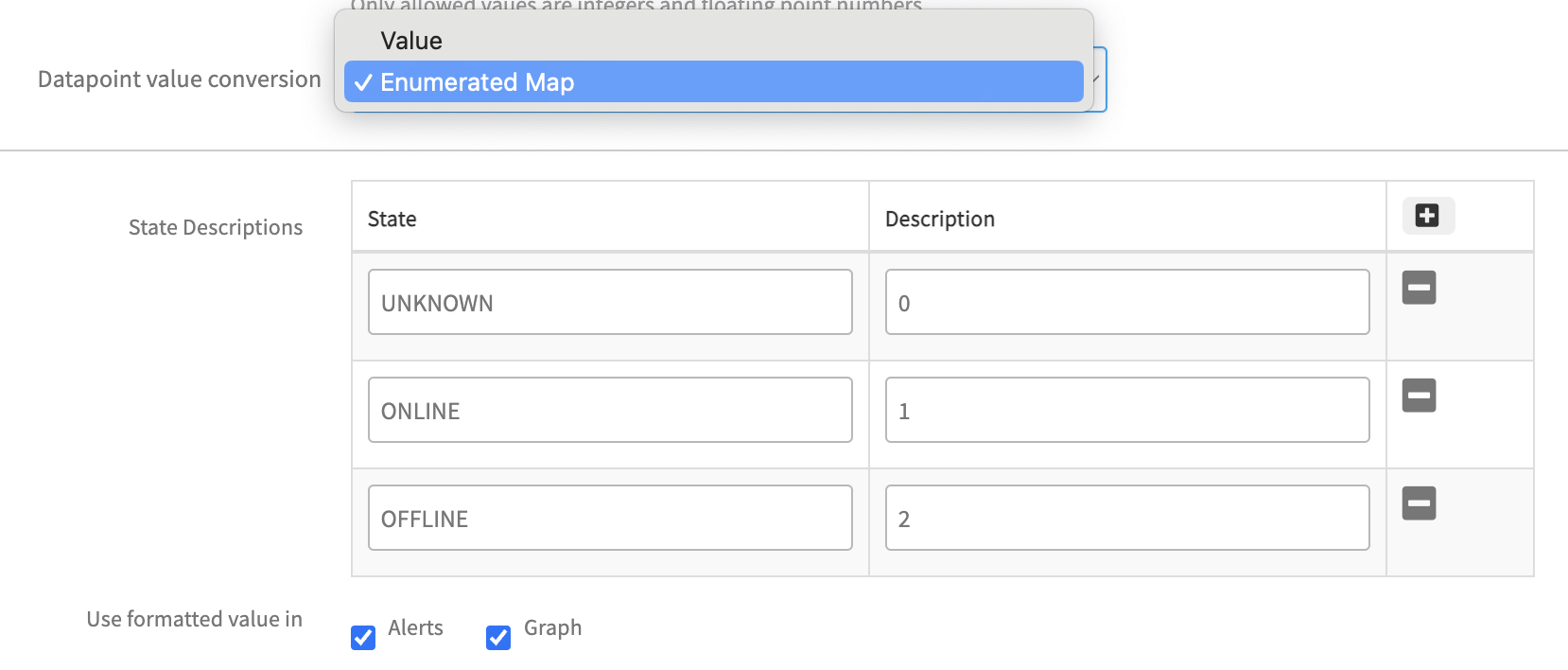
Additionally, there is an option to enable Use formatted value in Alerts & Graphs. If users opt to enable this feature, the enumerated mapping values provided will affect Alerts & Graphs. Otherwise, these values will not be reflected anywhere. The below screenshots have enum mapping reflections in monitoring data.

If User provide string value mappings for each possible state (i.e. integer-type values to string-type values) as demonstrated below: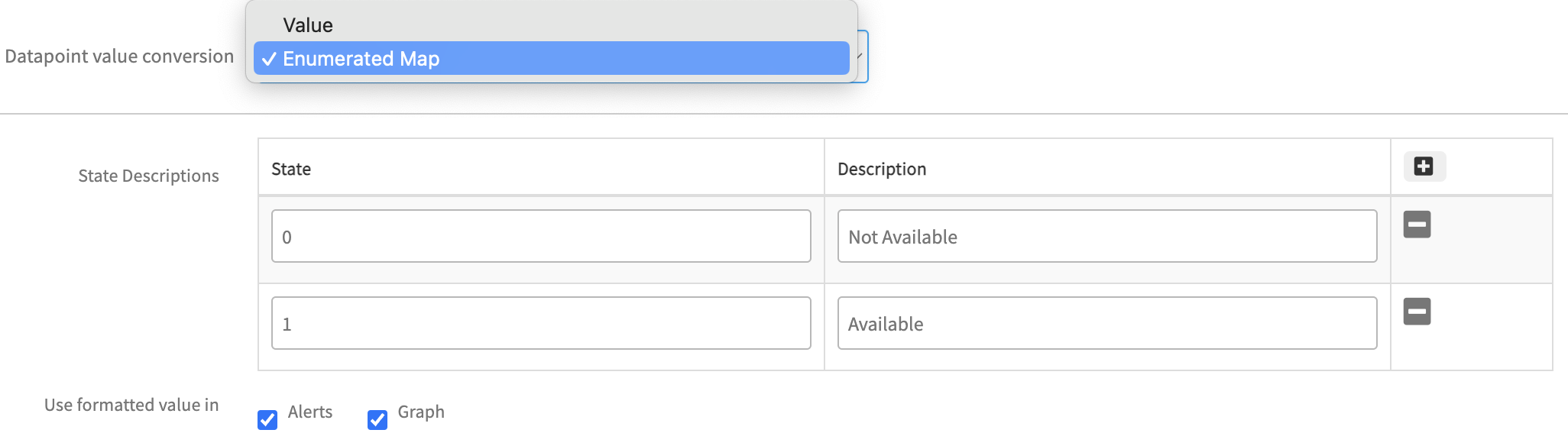
The above configuration will be reflected in monitoring data like below:
Alerting:
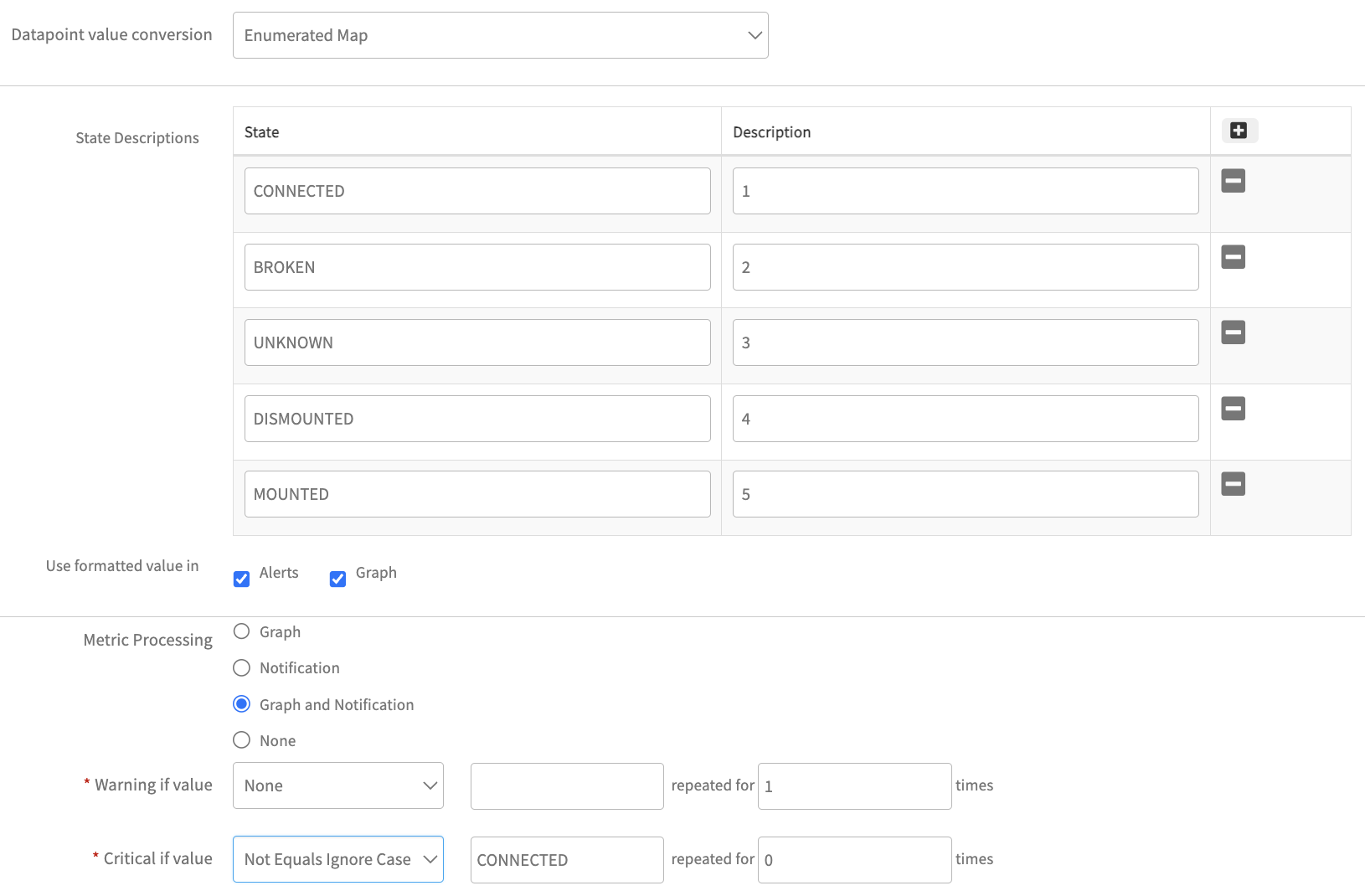
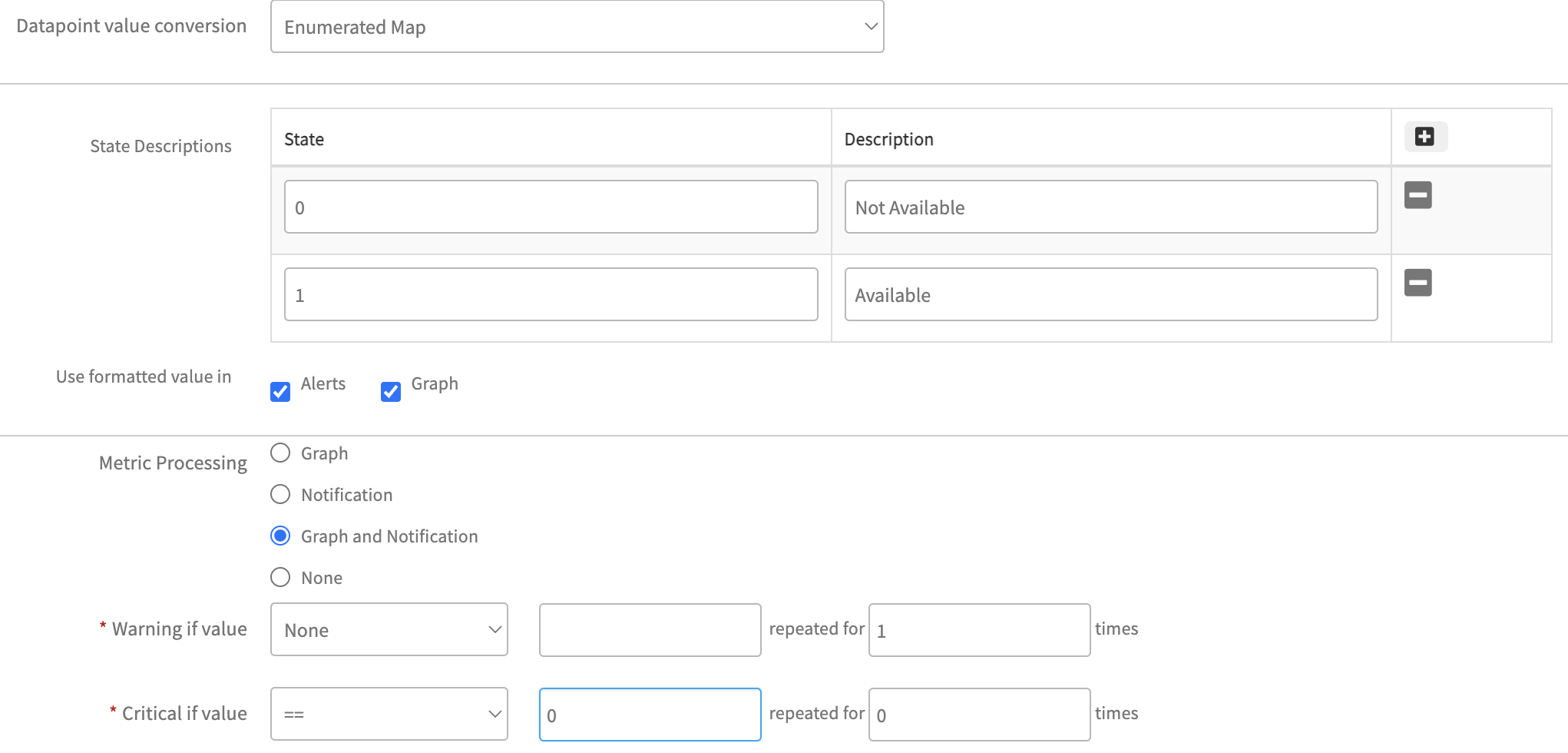
If the metric has an enumerated map enabled, users must follow the instructions below to select critical and warning alert conditions for alert creation.
- As outlined above, the prepared query returns the metric value as a string type. In accordance with this, users need to add N-number of enum maps for each possible state to different integer values.
- To enable critical or warning alerts, users must take into account the possible string-type values returned from the query.
- Refer to the screenshot below for guidance on enabling critical alerts if the enumerated map (string type to integer type) is enabled:
- Refer to the screenshot below for guidance on enabling critical alerts if the enumerated map (integer type to string type) is enabled.
How to Create an Oracle Metric
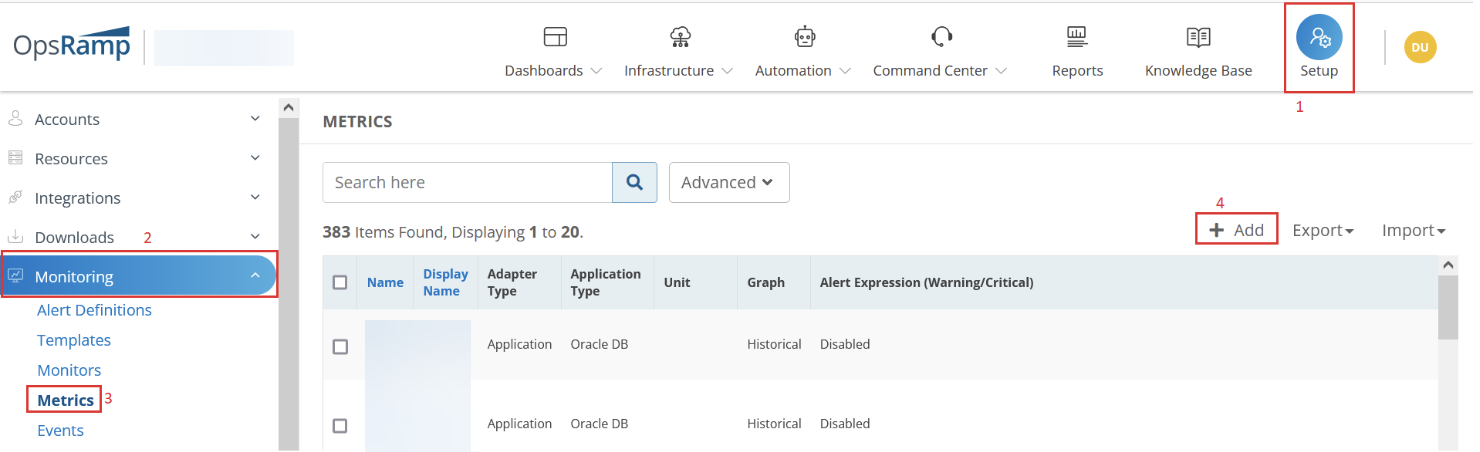
- Login to OpsRamp platform and Click on Setup from top menu and expand Monitoring from the side bar menu and click on Metrics.
- Click on +Add to create a new metric.
Configure the following parameters on the Create Metric page:
Metric Scope: Select either Service Provider Metric or Partner or Client Metric. Based on your access level and role, you might see this menu slightly different. If you have chosen Partner or Client Metric you will be prompted to choose a Partner/Client from contextual drop down which is dynamically populated.
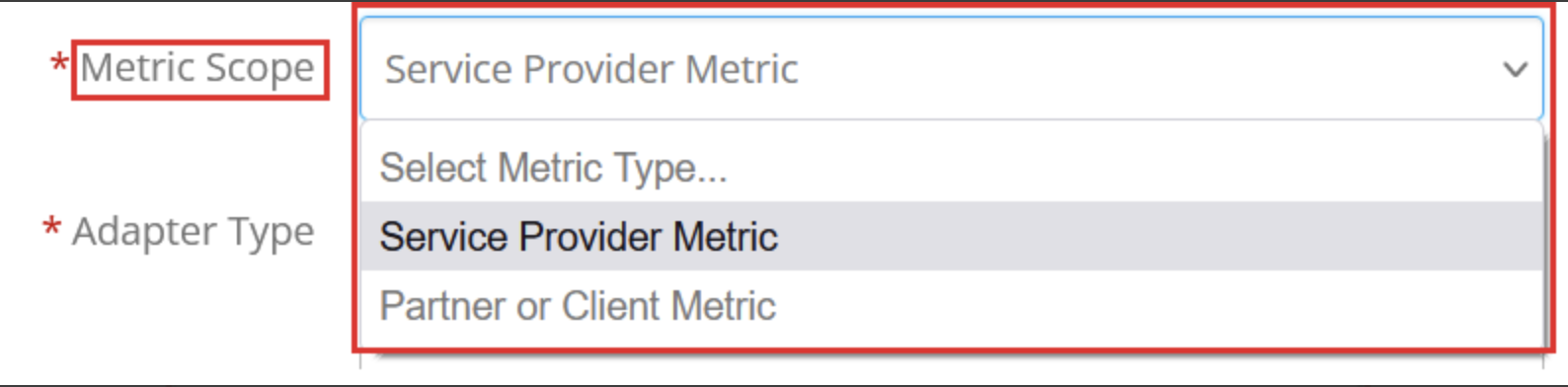
Adapter Type: Select Application from this dropdown.
Application Type: Select Oracle DB from this dropdown.

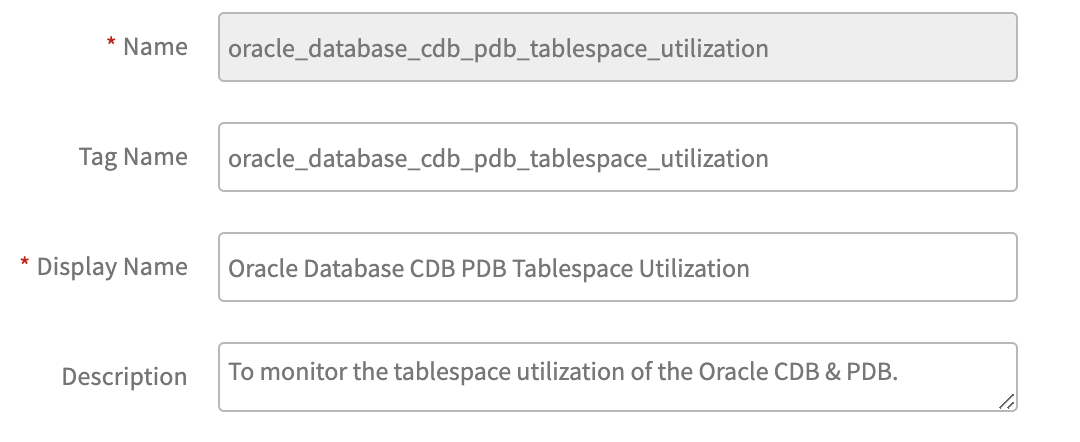
Name: Provide a meaningful metric name.
Tag Name: It will be filled automatically with the same metric name.
Display Name: Provide a meaningful metric display name.
Description: Provide an elaborate description about this metric.
SQL Query: Provide the prepared Oracle query. There is no need to provide semicolon at the end of the query.

Data Point type: Choose a suitable type from this dropdown. It has the following 8 pre-defined types. For this example, will go with Gauge.
- Counter Delta: It calculates delta on top of metric value. Counter Delta = (Current poll value - Prev poll value) Note: If the result is less than zero then it returns zero.
- Counter Rate: It calculates rate on top of metric value. Counter Rate = (Current poll value - Prev poll value) / (Current poll time - Prev poll time) Note: If the result is less than zero then it returns zero.
- Derive Delta: No support in both agent and gateway
- Derive Rate: No support in both agent and gateway
- Gauge: It returns direct metric value, which is returning from the script.
- Rate: It calculates rate on top of metric value. Rate = (Current poll value - Prev poll value) / (Current poll time - Prev poll time) Note: If the result is less than zero then it returns negative value.
- Delta: It calculates delta on top of metric value. Delta = (Current poll value - Prev poll value) Note: If the result is less than zero then it returns negative value.
- None: Same as Gauge
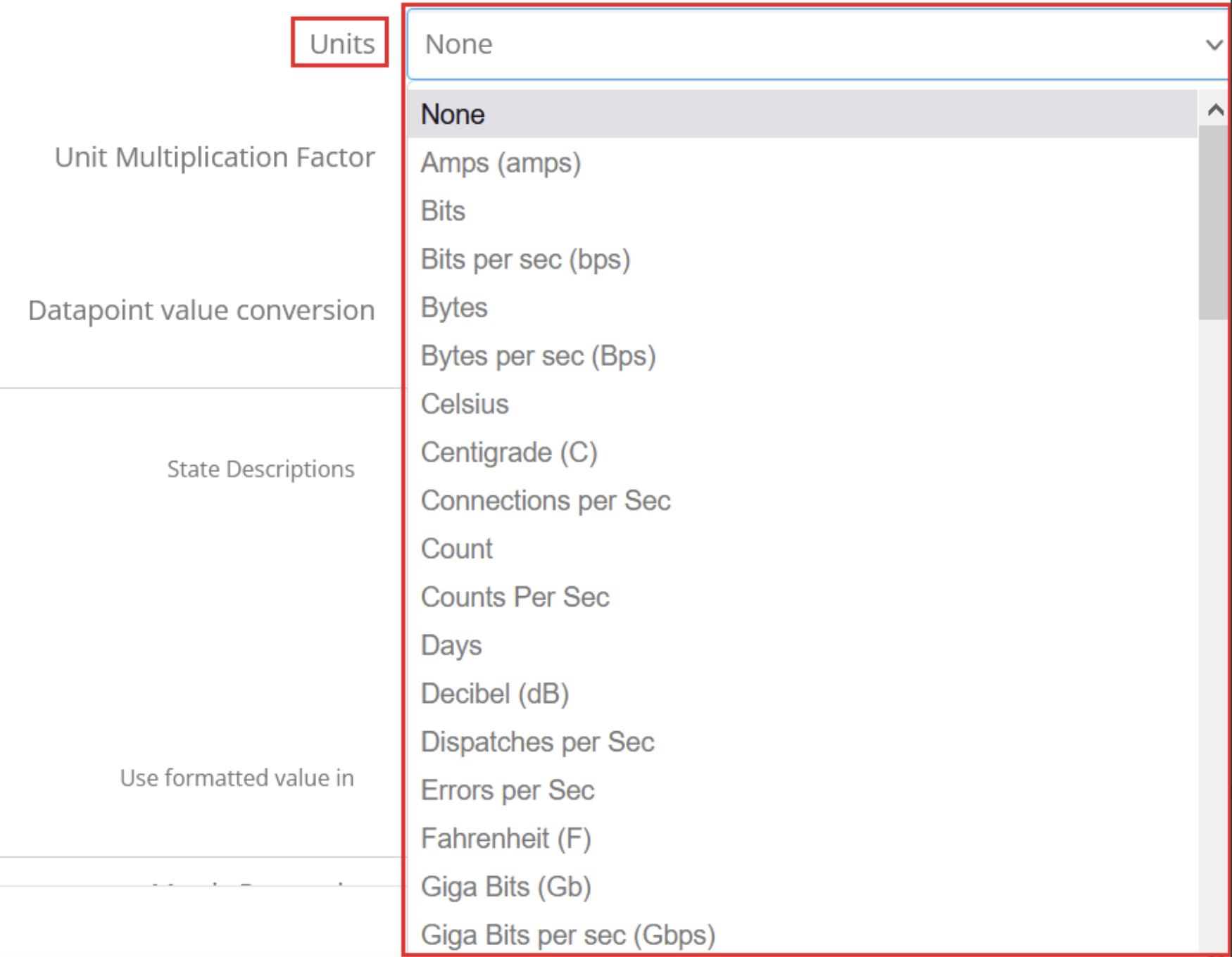
Units: Choose a suitable unit from this dropdown. For status related metrics doesn’t required any units. So go ahead with None.
Unit Multiplication Factor: Value to multiply the metric by. As this is status monitor, it doesn’t required this factor value. So go ahead with default value 1.0.

Datapoint value conversion: Choose a suitable option from any of the below two. Value = Choose this option (As shown in below) when no conversion required on the metric value. This is the default value for “Datapoint value conversion” dropdown.
Enumerated Map = Choose this option when enumeration based conversion is required.
For status-related metrics, it’s common for queries to return string-type values. However, our monitoring graphs only support integer values. Therefore, users need to provide mappings for all possible string-type values, as illustrated below:
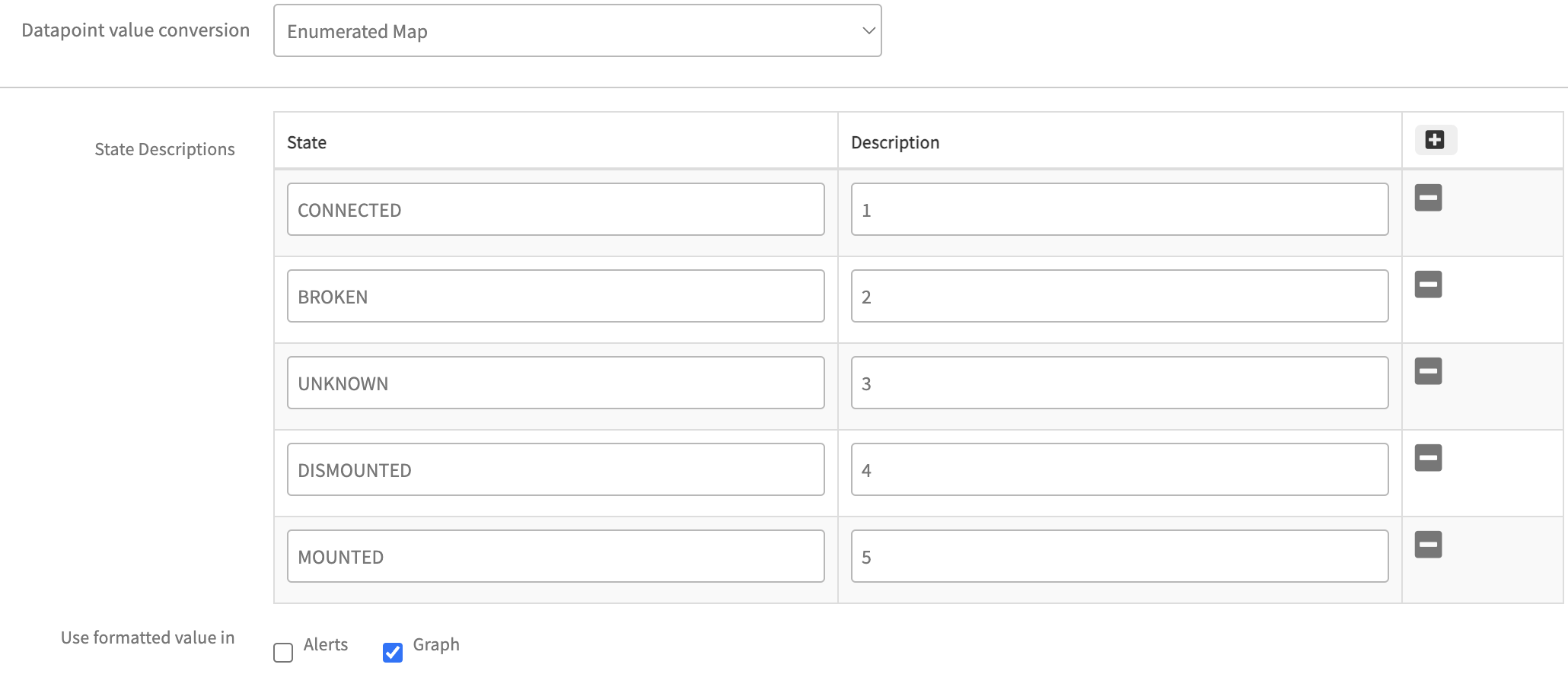
Sometimes If the query returns direct integer values to the metric but still the user wants to enable enumerated mapping then provide an enumerated map in reverse order. In this case the mapped strings displayed in the metric graph info page and alerts.
Example: 1- Running, 0 - Stopped Based on user requirements, select the “Alerts” and “Graph” checkboxes accordingly. When both checkboxes are selected, Graphs as well as Alert subject and details page will display integer values alongside enumeration mappings. Additionally, these mappings will appear in the “Get Latest Metric Value” page against the metric.
Metric Processing: Choose any of below suitable option based on requirement.
- Graph - Select if graph only needed, but no alerting is needed
- Notification - Select if alerting is only needed, but no graphing is needed
- Graph and Notification - Select if both graphing and alerting is needed
- None - Select if both graphing and alerting is not needed.
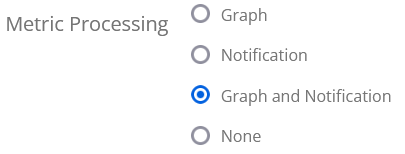
For Notification, Graph, and Notification, below options will populate dynamically:
How to Create an Oracle Monitor
- Login to OpsRamp platform and click on Setup from the top menu. Then, expand Monitoring from the side bar menu and click on Monitors.
- Click on +Add to create a new monitor.
- On the Create a Monitor page, configure the following parameters:
- Monitor Scope: Select either Service Provider Monitor or Partner or Client Monitor. Based on your access level and role, you might see this menu slightly different. If you have chosen to create the script at Partner or Client level, you will be prompted to choose a Partner/Client from the drop down, which is dynamically populated.
- Adapter Type: Select Application from this dropdown.
- Application Type: Select Oracle DB from this dropdown.
- Name: Provide a meaningful monitor name.
- Description: Provide a description about this monitor.
- Metrics: Click on Add and select all the metrics, which you created in the previous section.
Note: Make sure you select the right Oracle DB metrics. - Configuration Parameters: By default, you will see following configuration parameters:
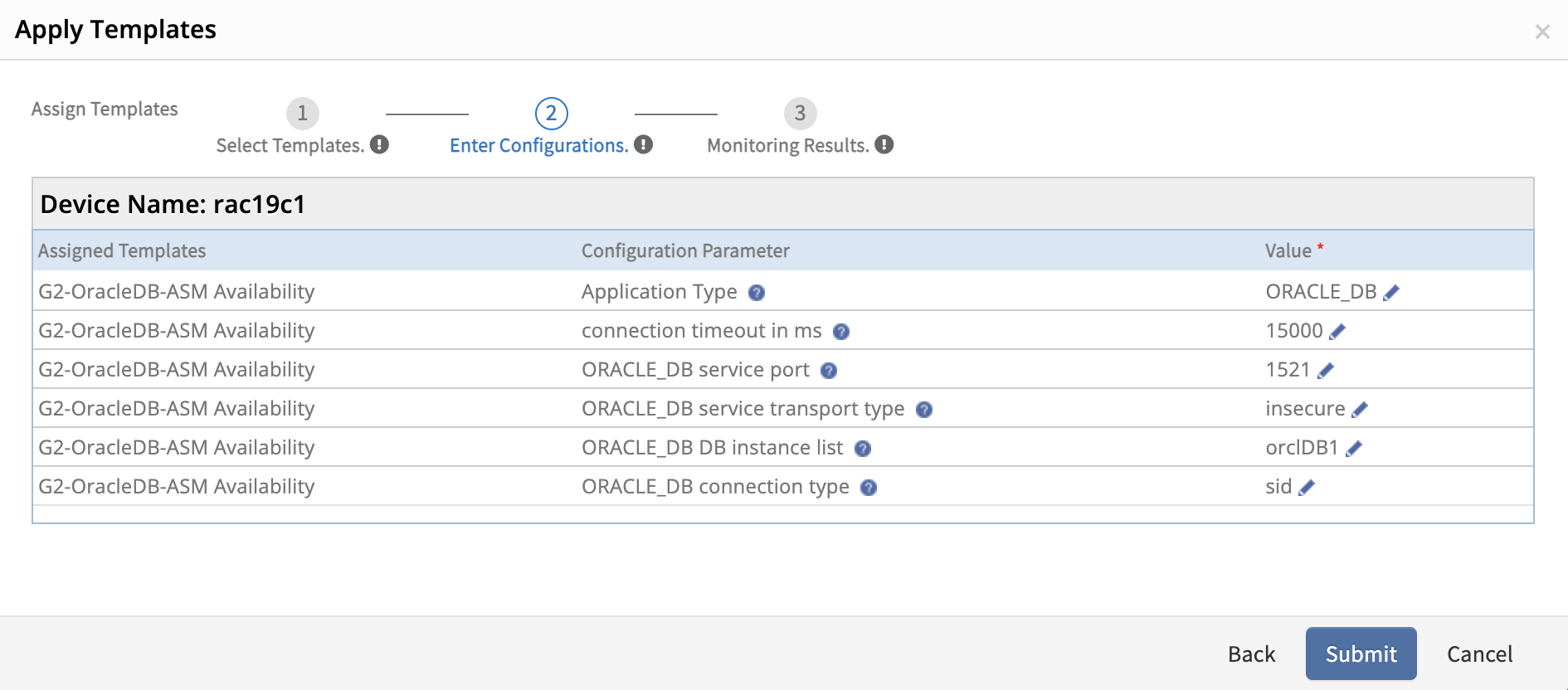
collector.application.type: Proceed with the default values, i.e ORACLE_DBconnection.timeout.ms: Proceed with the default value, i.e 15000 ms (If required you can increase it, but it should be well within the monitor frequency/poll time)oracledb.service.port: Proceed with the default value, i.e 1521 (If target Oracle environment running on different port then change it to right port number)oracledb.service.transport: Select correct secure/insecure transport type.oracledb.tls.connection: This configuration parameter introduced to allow users to monitor the secure/encrypted databases(TCPS protocol). The default value is No. For encrypted database monitoring mark it to Yes. (Supported Gateway Version - 14.0.0 onwards)oracledb.dbname.list: Provide database instance name here.- If the target Oracle environment has multiple database instances running on same port, provide an input like
InstanceName1,InstanceName2, etc. - If the target Oracle environment has multiple database instances and each one is running on different ports, provide input like
InstanceName1:Port1,InstanceName2:Port2, etc.
- If the target Oracle environment has multiple database instances running on same port, provide an input like
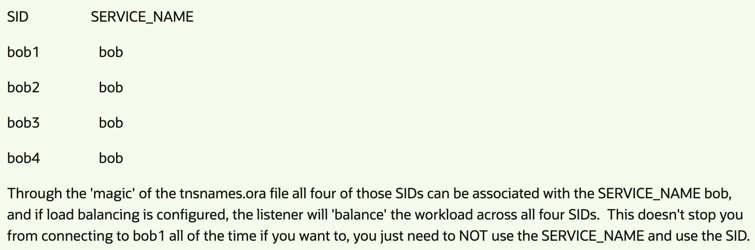
oracledb.connection.type: Select SID/ServiceName. Below are the differences between both SID and ServiceName in Oracle environment.- SID: This is specific to a database. It is unique in an environment and points to only one database in that environment.
- ServiceName: This can be associated with one or more SIDs like a RAC environment, where each instance is uniquely named yet all can be accessed through the
SERVICE_NAME.
The following screenshot shows an example of SID and ServiceName.
Note
- All these fields are default values can be editable while assigning the template on db resource.
- Users have identified database port numbers in multiple areas like DB credentials, oracle.dbname.list and oracledb.service.port. But framework should consider the port number from oracledb.service.port (for single instance) or If user provide oracledb.dbname.list input like InstanceName1:Port1, InstanceName2:Port2 then framework should consider the port number for each instance.
How to Create an Oracle Database Monitoring Template
Login to OpsRamp platform and click on Setup from the top menu. Expand Monitoring from the side bar menu and click on Templates.
Click on +Add to create a new template.
The following steps are to configure the Monitor Template page:
- Select Template Scope: Select either Service Provider Template or Partner or Client Templates. Based on your access level and role, you might see this menu slightly different. If you have chosen to create Partner or Client level, you will be prompted to choose a Partner/Client from a drop down which is dynamically populated.
- Collector Type: Choose Gateway Note: DB Query based monitoring supports Gateway collector type only.
- Monitor Type: For Gateway, select Monitors radio button.
- Applicable For: Always select Device.
- Template Name: Provide a meaningful template name.
- Description: Provide a description about this template.
Leave remaining fields as is and go bottom, Click on +Add against Monitors.
- Select Frequency: Select monitoring frequency based on metric requirement
- Monitor Definition: Choose monitor which you created in the previous section
- When To Alert: Proceed with the default option. i.e Breach of a Threshold
Then Click on Add and Save the template.
Assign Template
- Login to OpsRamp platform and Choose Partner and Client
- Click on ‘Resources’ under ‘Infrastructure’ from top menu
- Look for target device ip/hostname and click on Monitors
- Click on ‘Assign Templates’ and select ‘Collector Type’ and look for Template and Assign.
- User need to provide parameters based on their Oracle configuration. By default it will show default ones like below:
Multiple instances with different ports: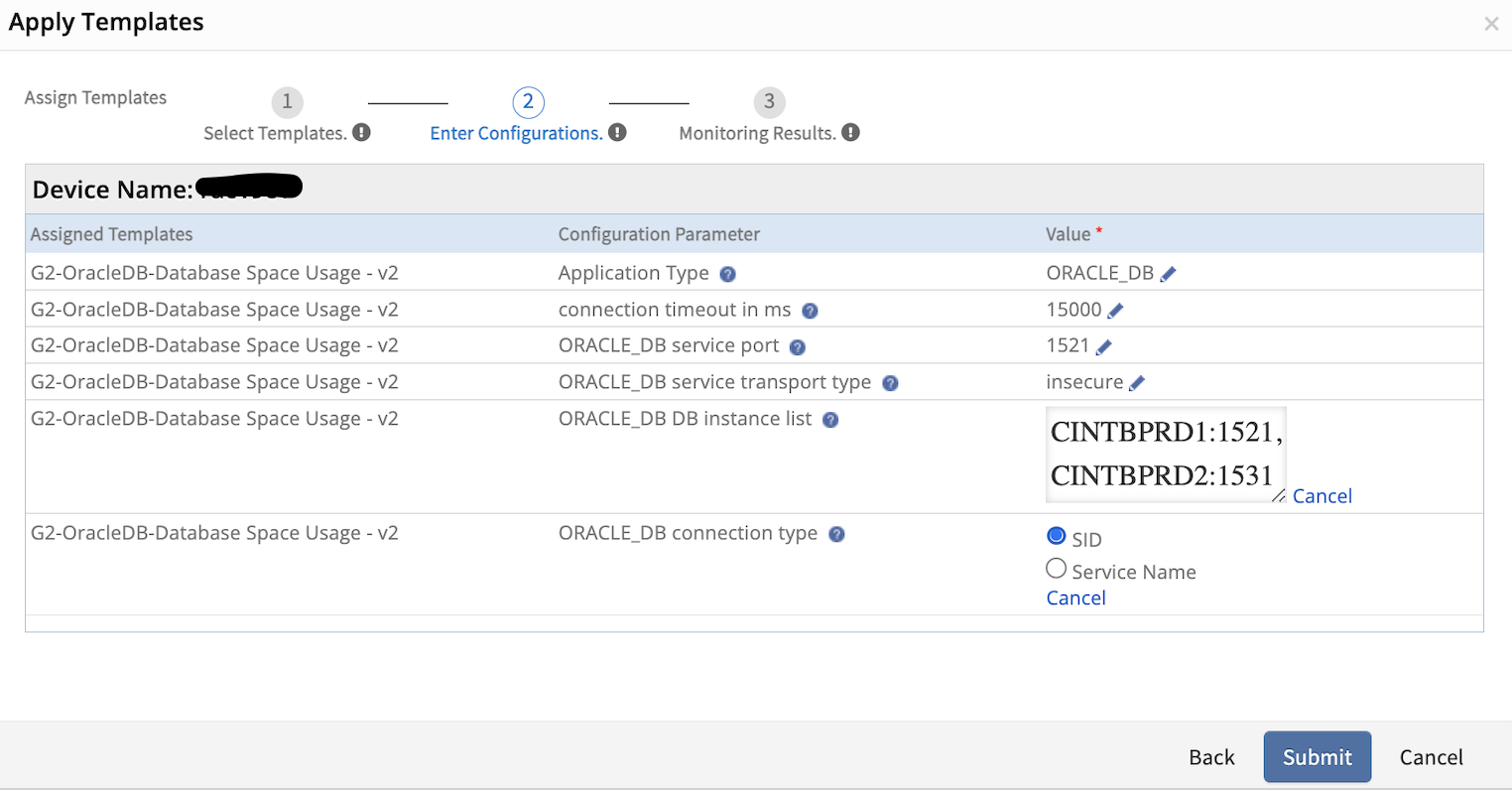
User must need to select right connection option for oracledb. Here we have connection type radio buttons (either SID or Service Name). If user select SID then must need to provide correct SID in DB instance list and If user select Service Name then must provide correct ServiceName in DB instance list.
How to Update and Add Metrics to Monitor, and Monitor to Template
If the user wants to update metrics, monitors and templates will need to follow below instructions, Otherwise it will not reflect changes on the target machine.
How to Update Metrics
If user wants to update a query, description, units, enumerated map and alertTokens, etc in a metric (Note - Metric Name will not change), the template can be updated with the following process:
- Navigate to the Setup > Monitoring > Metrics page, then open the specific metric.
- Update and save the metric.
- Open the monitor, reload the updated metric, and save the monitor.
- Open the template, re-add the updated monitor and save the template.
- Assign the template to the resources directly or via DMP to see the updated metric changes in the resources.
How to Update Monitors
If the user wants to update monitor like add/remove metrics, description, or configuration params that are part of a template, the template can be updated with the following process:
- Navigate to the Setup > Monitoring > Monitors page, then open the specific monitor.
- Update and save the monitor.
- Open the template, re-add the updated monitor and save the template.
- Assign the template to the resources directly or via DMP to see the updated metric changes in the resources.
Create Oracle Monitoring Templates
- Navigate to Setup > Monitoring > Metrics.
- Click + Add to create a new metric. The CREATE METRIC window appears.
- Fill in the following in the CREATE METRIC window:
Field Name Field Types Field Dependency Description Metric Scope Dropdown None Select the scope for the metric. Determines where the metric is created and available. Available options are: Service Provider Metric and Partner or Client metric. Partner Dropdown Appears when Partner or Client Metric option is selected. Auto-filled with the name of the partner. Client Dropdown Appears when Partner or Client Metric option is selected. Enter the name of the client. Adapter Type Dropdown None Choose the adapter category that this metric is associated with. Name String None Enter a unique internal name for the metric. Used for reference within the platform Tag Name String None Auto-filled with the metric name. Used for tagging and search purposes. Display Name String None Enter a user-friendly name that will appear in dashboards, alerts, and metric listings. Description String None Provide a detailed explanation of what the metric tracks and how it is calculated or collected. Class/Attribute path String None Enter the path of the attribute or class of the metric. Category Dropdown None Select the category of the metric. Units Dropdown None Enter the category of the metric. Unit Multiplication Factor Integer None Enter a factor to multiply the raw metric value. Default is 1.0. Useful for scaling raw data. Datapoint value conversion Dropdown None Select the way to handle the metric values. The available options are: - Value: Choose this option (As shown in below) when no conversion required on the metric value.
- Enumerated Map: Choose this option when enumeration based conversion is required.
Metric Processing Radio button None Select how the metric should be processed: Graph, Notification, Graph and Notification, or None. Warning if value Dropdown None Set the warning threshold by selecting a comparison operator (e.g., >=, <=, ==) and entering a value. An alert will trigger if this condition is met. Critical if value Dropdown None Specify how many consecutive polling intervals this condition must be true before triggering a warning alert. Subject String None Define the subject of the alert. You can use dynamic variables like ${severity}, ${component.name}, ${resource.name}, and ${metric value}. Description String None Provide detailed information to appear in the alert body. You can include dynamic tokens to pull in values at runtime for clarity. Create Oracle Monitor
- Navigate to Setup > Monitoring > Monitors.
- Click +Add. The CREATE A MONITOR window appears.
- Fill in the following in the CREATE A MONITOR window:
Field Name Field Types Field Dependency Description Metric Scope Dropdown None Select the scope for the metric. Determines where the metric is created and available. Available options are: Service Provider Metric and Partner or Client metric. Partner Dropdown Appears when Partner or Client Metric option is selected. Auto-filled with the name of the partner. Client Dropdown Appears when Partner or Client monitor option is selected. Enter the name of the client. Adapter Type Dropdown None Choose the adapter category that this monitor is associated with. Name String None Enter a unique internal name for the monitor. Used for reference within the platform Description String None Provide a detailed explanation of the monitor and how it is calculated or collected. Version String None Enter the version of the monitor. Metrics Checkbox None Click +Add to see all the existing metrics that are created in the previous section. For status-related metrics, it’s common for queries to return string-type values. However, our monitoring graphs only support integer values. Therefore, users need to provide mappings for all possible string-type values, as illustrated below:
SELECT ROUND((b3.value / (b1.value + b2.value) * 10), 2) AS “AVG GLOBAL LOCK GET TIME (ms)” FROM v$sysstat b1, v$sysstat b2, v$sysstat b3 WHERE (b1.name = ‘global lock sync gets’ AND b2.name = ‘global lock async gets’ AND b3.name = ‘global lock get time’) OR (b1.name = ‘global enqueue gets sync’ AND b2.name = ‘global enqueue gets async’ AND b3.name = ‘global enqueue get time’)
SELECT INSTANCE_NAME, DATABASE_STATUS FROM V$INSTANCEFor more information, see Create a Metric.
Note
When creating a custom metric using SQL query, do not add or append a semicolon(;) at the end of the query.Assign templates from setup
Assign OracleDB templates to one or more resources for a selected client and change the configuration parameters while assigning templates. For more information, see Assign Templates from Setup.
Assign templates at the device level
Applying Oracle templates at the device level helps assign one or more templates to a specific resource. You can change the configuration parameter default values while assigning the templates. For more information, see Assign Templates at the Device Level.
Template configuration parameters:
Configuration Parameter Description Connection Time-out The maximum time to connect to the database. The driver waits for the specified time before timing out due to connection failure. The default time is 15000 milliseconds(ms). Service Transport Type To configure the database at a secure end-point. The default type is In-secure. The connection is Secure when the data sent between the client and server is encrypted. Service Port The port number where the database is running. The connection is made to the specified port if you specify the port and the database name. The default port is 1521. DB Instance Name The name of the database to connect to. The default name is root. - If you have multiple instances with different ports, use the following syntax:
Instance1:Port1,Instance2:Port2Note: Do not consider the service port configuration value here.
- If you have a single instance, use the following syntax:
“Instance1”Note: Consider the port from the service port configuration for this case.
- If you have multiple databases with the same port, use the following syntax:
“Database1, Database2, Database3”Note: Consider the port from the service port configuration for this case.
Application Type The application type value to identify the adapter. For example, ORACLE_DB.
Warning: Do not change the default application type value.Assign Template from Device Management Policies
Device management policies help manage resources. You can assign monitoring templates, knowledge base articles, and custom attributes using device management policies. The device management policy can be applied to one or a set of resources. For more information, see Create Policies.
View Resource Metrics
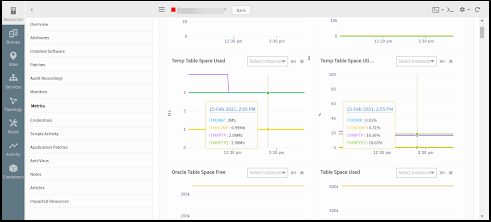
The gateway monitors the application using the assigned templates and displays the results in graphical format. To view resource metrics, click the database resource name > resource Details > Metrics.
Points to Be Considered
- While creating template user need to select Gateway as collector type.
- Assign the right Oracle database credentials (which have all required priviliges to execute metric queries) on the target Oracle server.
- Telnet should work from Gateway to Target machine on mentioned DB port.
- If the user has instance level authentication, Need to assign all credential sets on the target Oracle server. So that OpsRamp Gateway can connect and fetch metric data for all db instances.
- Need to provide an correct instance SID or ServiceName to connect the Oracle Instance.
- To provide right transport type like secure or insecure
- While preparing Oracle query, Users must return max one or two fields from the query and Users should not consider frequently changed columns as component names (like Oracle session name, userName, ..etc) or any combinations (like databaseName_sessionId, tablespaceName+userId, …etc).
- If any database connectivity issues occur from the Gateway, the Framework generates alerts such as ‘oracledb.auth.error.’ However, it does not generate alerts for query syntax errors, empty data, or access denied issues.
Troubleshooting
Usecase 1 - Failed to get latest metric values/Gateway is offline
When the user applies an Oracle monitoring template on devices and encounter the message “Failed to get latest metric values/Gateway is offline” while fetching latest metric data, Follow the steps below:
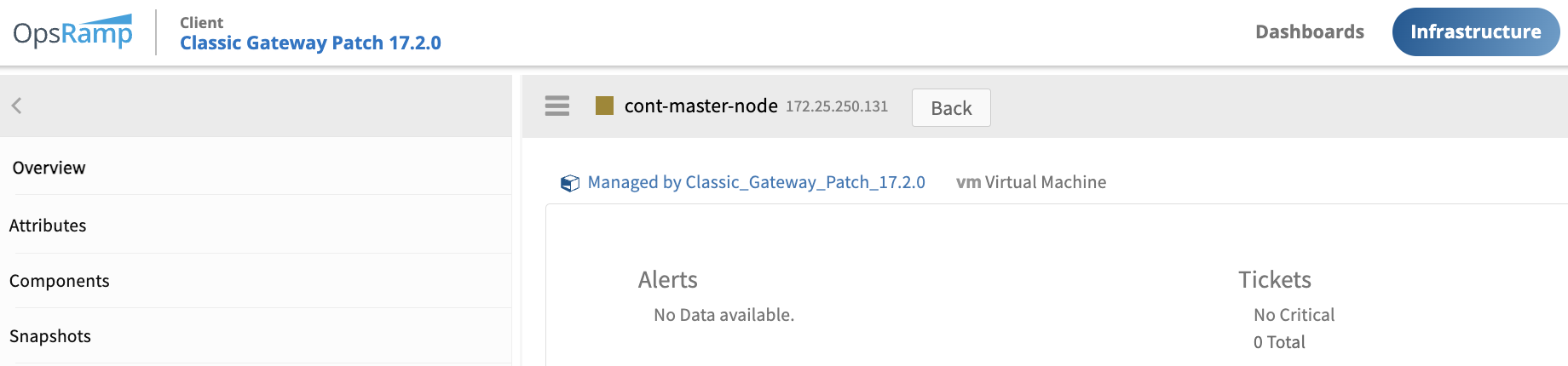
Navigate to the Overview section of the Device (Infrastructure > Resources > Search using IP or Device Name) and on that device, ensure that the Gateway is online (indicated by blue color as shown below).
Identify whether a template is global or customer written.
Review any alerts associated with the template on the Overview page of the Device (or) navigate to Command Center » Alerts page and filter using the specific server name or Ip address. Common alert MetricName is oracledb.auth.error. For Gatway version 17.2.0 and above, The component name like
_ and subject and descriptions are as follows: Alert subject format - Oracle database monitoring not working for device - <DeviceName/IpAddress> Monitor -
instance - Capturing exact errors/exceptions from the target device and placed it to Alert Descriptions, Sample alert like below: 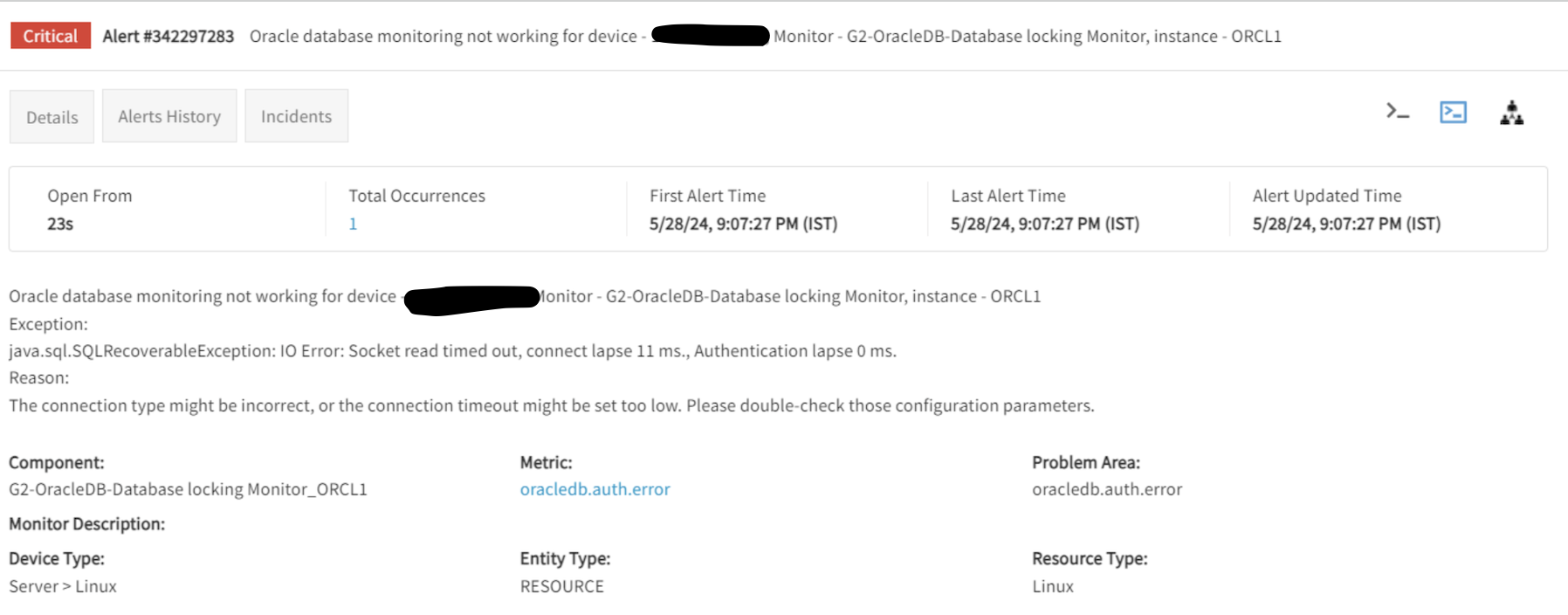
For older Gateway versions, The component name like
and we have static alert format with the MetricName is oracledb.auth.error, Sample alert like below: 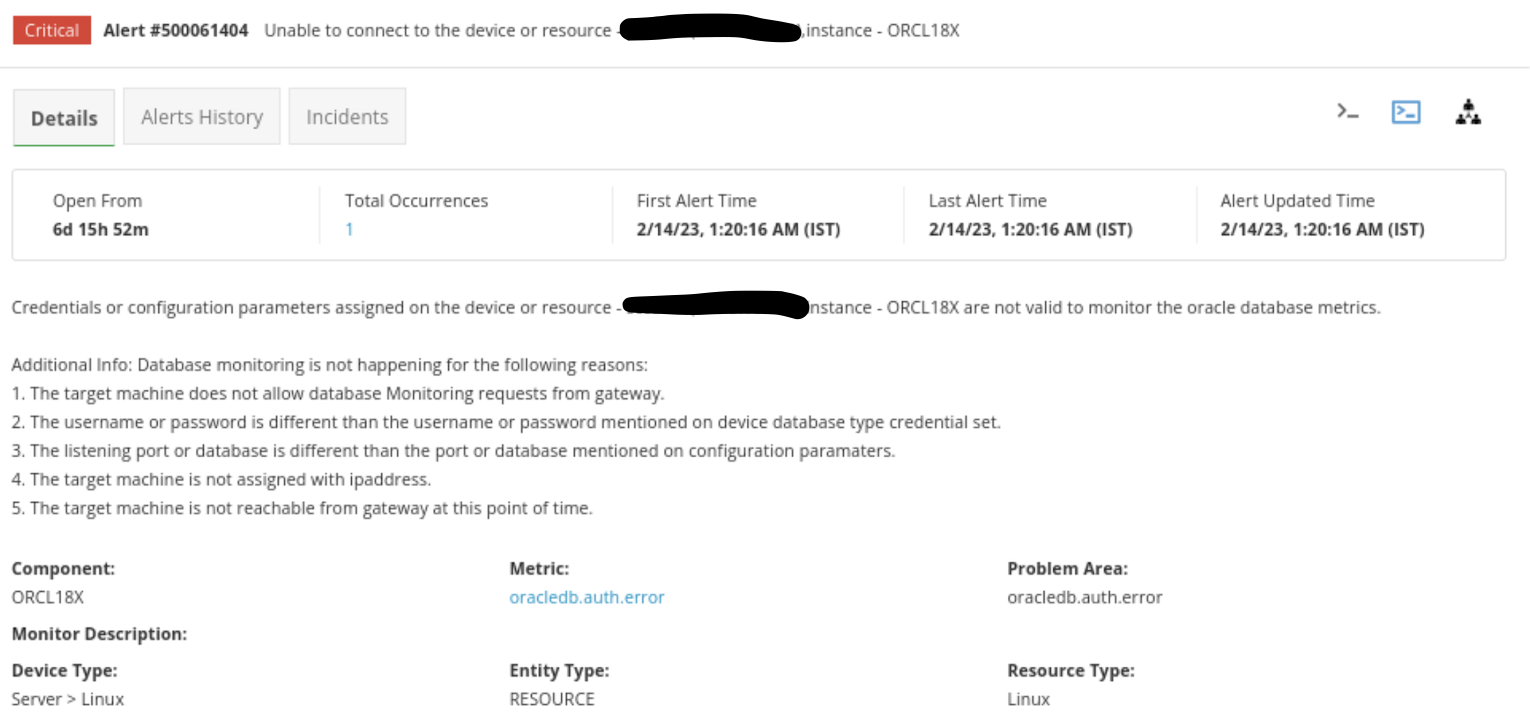
Check key points to enable Oracle monitoring. Refer to Points to Be Considered
Access gateway Users can access the gateway using the following two methods:
- Login to the gateway using ssh
ssh username@gateway-ip - Login to the gateway using browser console
- Login to the gateway using ssh
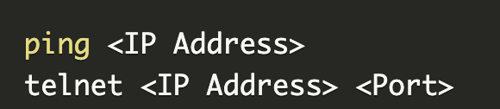
Check database server IpAddress & port connectivity:
- Refer Step-5 Access gateway
- Type ping
and press enter, then telnet like below:
- Connect to GCLI terminal in gateway
Classic Gateway:
- Login to the gateway
- Refer Step-5: Access Gateway
- Type gcli and press enter, then gcli terminal will open
Nextgen Gateway:
- Login to the gateway
- Refer Step-5: Access Gateway
- Execute command
kubectl exec -it nextgen-gw-0 -c vprobe -n <namespace> -- bashNote: Here we need to replace theif applicable, otherwise execute: kubectl exec -it nextgen-gw-0 -c vprobe -- bash - Type gcli and press enter, then gcli terminal will open
Access Oracle logs. By default the OpsRamp gateway capturing few error logs, If user want to enable all available logs which are related to OracleDB then follow below steps:
- Access gcli mode by running: gcli
- Refer Step-7: Connect to GCLI terminal in gateway
- Use this command to enable debug logs:
flag add oracledb.log on 30 - Exit gcli prompt and run this command to observe logs:
sudo tail -100f /var/log/app/vprobe.log - In Nextgen Gateway, If User want to copy files from the vprobe container to the gateway cli, execute the following command after exiting the container:
kubectl cp <namespace>/nextgen-gw-0:<source_path> <dest_path> -c vprobeDownload files from the gateway cli.
- Access gcli mode by running: gcli
Execute Oracle query manually from the GCLI on the target machine.
- Access gcli mode by running: gcli
- Refer Step-7: Connect to GCLI terminal in gateway
- Execute Oracle query via gcli prompt using Oracle SID:
db oracledb <Ipaddress> <username> <password> <port> <SID> 15000 10000 insecure <Yes/No> <"Query"> - Execute Oracle query via gcli prompt using Oracle ServiceName:
db oracledb <Ipaddress> <username> <password> <port> <ServiceName>:servicename 15000 10000 insecure <Yes/No> <"Query">Check If the query output returns more than 2 columns then refer How to Prepare Oracle metric query & If manual query execution returns any oracle exceptions then refer Oracle Exceptions.
- Access gcli mode by running: gcli
If you are unable to determine the root cause of the issue from the logs or query output, or if different exceptions occur when executing an Oracle query, please raise a case and attach the relevant logs and manual query output.
Usecase 2 - Graph data is not populating for specific or all metrics
- Validate whether the metric is retrieving data from end device by checking latest snapshot data. If not, refer to Usecase1 - Failed to get latest metric values (or) Gateway is offline.
- Also check if the graph is enabled or not at metric level. If its enabled, check whether the data got from latest snapshot data is a string. If it’s a string, then check if Enum Mapping is defined for that string at metric level.
- If Enum mapping is not defined for that particular string and it’s a global template, then raise a case while attaching screenshots of latest snapshot data, Enum Mapping defined at Metric.
- If Enum mapping is not defined for that particular string and it’s a customer written template, then suggest customer to edit the metric and add this new state in State Descriptions field.
- If you are unable to determine the root cause of the issue after following the above steps, please raise a case and attach the relevant logs and manual query output.
Usecase 3 - User is observing gaps in metric graphs.
This issue might be due to the following reasons:
- Gateway going offline at that time
- The device is not reachable and port connectivity issues.
- There may be no data available for the metric on the device at that time.
Check the debug level logs to cross verify if Gateway was offline at that time.
If you do not find any logs related to those, then raise a case while attaching logs, to analyse query output at those specific times when graph is not populating.
Usecase 4 - Alerts not getting generated on resource for particular metric.
Check latest snapshot data to see if we are retrieving any data from device for that metric and also verify the thresholds defined for the metric.
If the latest snapshot data is also not coming for that metric, then execute the command or script manually on device, to see if any data exists for that metric.
Usecase 5 - Alerts generated do not align with the defined alert thresholds
Refer to the Alerts Hierarchy outlined below:
Alert Thresholds Precedence Order: Template level threshold > Device level threshold > Component level threshold
Alert thresholds follow a hierarchical order, starting from the component level and moving up to the template level. Each level can override the thresholds set at the previous level. Component-level settings override those set at the device level, and device-level settings take precedence over template-level settings.
This hierarchy ensures that monitoring configurations can be finely tuned at various levels of the system, allowing for granular control over alerting parameters. This approach enables more precise and effective management of alerts tailored to the specific needs of each level.
FAQs
Why isn’t the latest snapshot available?
Refer to Usecase1 - Failed to get latest metric values (or) Gateway is offline.
Why aren’t the graphs reflecting?
Check Points to be Considered and Usecase 2 - Graph data is not populating for specific or all metrics
Why is the
oracledb.auth.erroralert generated like below?
Refer to Usecase1 - Failed to get latest metric values (or) Gateway is offline.
What are the possible Oracle Exceptions?
- ORA-12505: This error indicates that the listener received a connection request but could not process it because the service requested by the client is not available or is not properly configured. This could happen if the service name specified in the connection string does not match any service registered with the listener or if the listener configuration is incorrect.
- ORA-12514: This error indicates that the listener could not find the requested service or database instance. This could happen if the service name specified in the connection string does not match any service registered with the listener or if the database instance is not started.
- ORA-01034: Database Unavailable: The Oracle database instance is not running or is inaccessible, possibly due to a shutdown, startup failures, or network issues.
- ORA-12154: The client is unable to resolve the specified service name in the connect string, often due to syntax errors or misconfiguration of the TNSNAMES.ORA file.
- ORA-02391: The user has exceeded the maximum number of concurrent sessions allowed per user.
- ORA-12170: The client was unable to establish a connection within the specified timeout period, often due to network issues or database overload.
- ORA-12547: A communication breakdown between the client and server may be caused by network issues or server process termination.
- ORA-12541: The client is unable to establish a connection with the listener process on the server. This could be due to the listener process not running, an incorrect hostname or port, or network issues.
- ORA-01017: An incorrect username or password was provided for login.
- ORA-28000: The user account is locked, possibly due to multiple failed login attempts or administrator action.
- ORA-01005: Attempt to log in without entering a password.
- ORA-12638: Failure to retrieve credentials during the authentication process.
- ORA-12641: The authentication service fails to initialize properly, often due to misconfiguration or service issues.
- ORA-28001: The user’s password has expired according to the password expiration policy set by the database administrator.
- ORA-28002: The user’s password is about to expire within the specified number of days, according to the password expiration policy.
- ORA-28003: The provided password does not meet the password complexity requirements specified by the password verification function.
- ORA-28017: This error specifically relates to the SYS user account. It occurs when the provided password for the SYS user is incorrect.
- ORA-12545: This indicates a networking issue where the host or IP address specified for the Oracle database instance is unreachable or incorrect.
Note
These exceptions may occure while manually executing an Oracle query via Gateway GCLI prompt. To resolve these type of issues, ptry the following solutions:
- Check whether the Oracle database instance with the specified SID is up and running.
- Ensure that the listener is properly configured to recognize the SID by checking the listener.ora file.
- Verify that the connection descriptor contains the correct and complete SID value.
- Ensure that the client machine(Gateway) has the necessary privileges and is authorized to access the specified database instance.
- Try restarting the listener service or the Oracle database instance to see if that resolves the issue.
Where can I check OpsRamp Supported Oracle Metrics?
Check the Recommended Templates page within the public documentation.
If the required monitoring support is not found on these pages and it’s a generic request applicable beyond the customer’s specific needs, then only submit a case to support team for Request for Enhancement (RFE).
However, if the monitoring requirement is specific to the customer’s needs, then customers need to develop their own script by following this documentation.
How can I identify whether a template is Global or Customer written?
The details available in the links below only pertain to Global Templates and Metrics.
Why isn’t the template getting the latest metric snapshot date?
Refer to Usecase1 - Failed to get latest metric values (or) Gateway is offline
What steps should a user follow if they want to create their own query based custom metric for database monitoring?
Users can refer to the Create Custom Metrics guide available in the public documentation.
This guide provides comprehensive instructions on how to develop query based custom metrics.
Refer to Creating Custom Metrics.
he above documentation is for query based Oracle monitoring, similarly if they want to create custom metrics for PostgreSQL, MySQL, or MSSQL, customers should select the corresponding Application type (PostgreSQL, MySQL, or MSSQL) during the metric creation process.
Can customer create query based metrics using Agent collector type?
No, Query-based metrics only work with collector type Gateway, not with Agent.
How to plot Graph for String values like health or status metrics?
To plot graph for state or status-related metrics returned as strings, utilize the Enum Mapping option. Refer to How to Handle Enumberated Mappings and Alerting.
Why are metrics and monitor changes not getting reflected in the template (latest metric data or graphs or alerts)?
Refer to How to Update and Add Metrics to Monitor, and Monitor to Template.
How can I exclude monitoring for some components of metric?
If the user wants to exclude monitoring some components of metric, then they can use the Component Filters option of RSE.
By using these component filters, you can monitor specific components or ignore unwanted components from monitoring. For more information, refer to Component Filters.
For Oracle monitoring, should SSH credentials assigned on the target device or on the Gateway device?
In Oracle monitoring, No need to assign the SSH login credentials on the target device, not on the Gateway device.
What are the authentication error alerts (Database Related) observed on device Overview page?
If it’s Oracle query based template, make sure that Oracle Database Type credentials are assigned in device’s credentials tab.
What are Oracle Query execution errors on device like permissions error?
Assigned Database Type credentials must have sufficient permissions to execute the query on the device. Refer - Points to be considered.
How can I find the queries used in the template?
Go to the Setup page and navigate to Monitoring. Click on Metrics > Search. Search the exact metric based on scope, then open the metric definition. The monitoring query is available on the metric definition.
Can a user assign version 1 and version 2, 3, 4, etc. of a template on the same device?
No, User cannot assign version 1 and version 2, 3, 4, etc., of a template to the same device simultaneously. In nearly all cases, the metrics present in version 1 (v1) will also be included in version 2 (v2) or later versions. The later versions typically include additional metrics, enhancements to existing metrics or methodologies, and bug fixes. Therefore, we recommend always using the latest version of the template to ensure that users benefit from these improvements and new features.
Supported Templates
Collector Type Template Name Gateway G2-OracleDB-Database Monitoring G2-OracleDB-Database backups G2-OracleDB-Database scheduled jobs G2-OracleDB-Database locking G2-OracleDB-ASM Availability G2-OracleDB-Database Space Usage G2-OracleDB-ARCHIVER G2-OracleDB-Password Security G2-OracleDB-Alert Log Status G2-OracleDB-Listener SID Availability G2-OracleDB-Monitored License Used Status G2-OracleDB-Database Resource Usage G2-OracleDB-Listener G2-OracleDB-DataGuard G2-OracleDB-Sessions - v3.0 G2-OracleDB-Oracle Library Stats - v2.0 G2-OracleDB-Oracle Memory - v2.0 G2-OracleDB-Performance - v2.0 G2-OracleDB-Sessions - v2.0 G2-OracleDB-System Stats - v2.0 G2-OracleDB-System Summary - v2.0 G2-OracleDB-Table Space - v2.0 - v2.0 Supported Metrics
Metric Metric Display Name Unit Description Oracle_asm_alertlog_size Oracle ASM AlertLog Size megabytes(MB) This metric monitors the disk used space (in MB) by ASM alert log Oracle_database_archivelog_total_usage Oracle Database Archive Log Total Usage Gigabytes(GB) This metric monitors the total size (in GB) of Archive log Oracle_database_archfile_usage Oracle Database ArchFile Usage Megabytes(MB) This metric monitors the size (in MB) of each Arch file Oracle_database_datafile_availability Oracle Database Datafile Availability This metric monitors the datafile availability. Below are the possible values:
1 - AVAILABLE
2 - INVALIDOracle_database_invalid_objects Oracle Database Invalid Objects This metric displays invalid objects available or not Oracle_database_locked_critical_users Oracle Database Locked Critical Users This metric monitors the locked critical users information Oracle_database_backup_mode Oracle Database Backup Mode This metric monitors the oracle database backup mode like Active or InActive Oracle_database_archivegap_detection Oracle Database Archive Gap Detection This metric monitors the Archive GAP detection Oracle_asm_diskgroup_type Oracle ASM Disk Group Type This metric displays the type of the ASM disk group Oracle_asm_disk_mode_status Oracle Database Restore Point Guarantee Flashback Status Monitors the Oracle DB backup restore point Guarantee Flashback DB Status. Below are the possible values:
YES - 1
NO - 0Oracle_database_daysSinceLastRestorePoint Oracle Database Days Since Last Restore Point Days Monitors the age (In Days) of last successful restore point Oracle_database_restorePoint_GuaranteeFlashback_Status Oracle Database Restore Point Guarantee Flashback Status Monitors the Oracle DB backup restore point Guarantee Flashback DB Status. Below are the possible values:
YES - 1
NO - 0oracle_database_daysSinceLastRestorePoint Oracle Database Days Since Last Restore Point Days Monitors the age (In Days) of last successful restore point Oracle_database_blockCorruption_count Oracle Database Block Corruption Count Count Monitors the count of block corruption in Oracle DB Oracle_database_blockCorruption_type Oracle Database Block Corruption Type Monitor the type of block corruption in Oracle DB Oracle_database_undoUnexpired_count Oracle Database Undo Unexpired Count Count Monitors the count of Undo Unexpired in Oracle DB Oracle_database_indexLogging_count Oracle Database Index Logging Count Count Monitors the count of Index logging in Oracle DB Oracle_database_licenseOptionUsage_status Oracle Database License Option Usage Status Monitors the Oracle DB License Option Usage Status: Below are the possible values:
YES - 1
NO - 0Oracle_database_redoLog_status Oracle Database RedoLog Status Monitors the status of each redo log. Below are the possible values:
FileInUse (File is in use) - 0
INVALID (File is inaccessible) - 1
STALE (File's contents are incomplete) - 2
DELETED (File is no longer used) - 3Oracle_database_backup_archive
Monitors the status of the Oracle Database Archive Backup DaysAgoOracle Database Archive Backup DaysAgo Days Oracle_database_backup_full
Monitors the status of the Oracle Database Full Backup DaysAgoOracle Database Archive Backup DaysAgo Days Oracle_database_backup_usermanaged
Monitors the status of the Oracle Database User Managed Backup DaysAgoOracle Database User Managed Backup DaysAgo Days Oracle_database_backup_incremental
Monitors the status of the Oracle Database Incremental Backup DaysAgoOracle Database Incremental Backup DaysAgo Days Oracle_database_backup_rman
Monitors the status of the Oracle Database RMAN Backup DaysAgoOracle Database RMAN Backup DaysAgo Days Oracle_database_scheduler_jobs_status
Monitors the status of the Oracle Database Scheduler Jobs StatusOracle Database Scheduler Jobs Status Oracle_database_dbmsjobs_failure_count
Monitors the status of the Oracle Database DBMS Jobs Failure CountOracle Database DBMS Jobs Failure Count Count Oracle_database_autotask_job_status
Monitors the status of the Oracle Database AutoTask Job StatusOracle Database AutoTask Job Status Oracle_database_lockedusers_status
Monitors the status of the Oracle Database Locked Users StatusOracle Database Locked Users Status Oracle_blocking_session_count
Monitors the status of the Oracle Blocking Session CountOracle Blocking Session Count Count Oracle_asm_disk_status
Monitors the status of the Oracle ASM Disk StatusOracle ASM Disk Status Oracle_asm_diskgroup_status
Monitors the status of the Oracle ASM DiskGroup StatusOracle ASM DiskGroup Status Oracle_asm_acfs_status
Monitors the Oracle ASM ACFS StatusOracle ASM ACFS Status Oracle_asm_diskgroup_utilization
Monitors the status of the Oracle ASM DiskGroup Space UtilizationOracle ASM DiskGroup Space Utilization % Oracle_asm_diskgroup_utilization
Monitors the status of the Oracle ASM DiskGroup Space UtilizationOracle ASM DiskGroup Space Utilization % Oracle_database_required_mirror_freespace
Monitors the status of the Oracle Database Including different redundancy requirements (Safely usable data usage)Oracle Database Required Mirror Free Space MB Oracle_database_safelyusable_diskspace
Monitors the status of the Oracle Database Including safely usable disk space on different redundancy (Safely usable data usage)Oracle Database Safely Usable Disk Space MB Oracle_database_tablespace_usedPercent
Monitor the Oracle table space used percentOracle Database Tablespace Used Percent % Oracle_database_flash_recovery_usage
Flash recovery usage (in MB) of the oracle databaseOracle Database Flash Recovery Usage MB Oracle_database_flashback_log_usage
FlashBack Log usage in percentOracle Database FlashBack Log Usage % Oracle_database_flashback_log_usage
FlashBack Log usage in percentOracle Database FlashBack Log Usage % Oracle_database_recoveryDest_used_percentage
Oracle Database Recovery Destination usage in PercentOracle Database RecoveryDest Used Percentage % Oracle_database_recoveryDest_size
Oracle Database Recovery Destination Size in MBOracle Database RecoveryDest Size MB Oracle_database_recoveryDest_used_sizeoracle_database_recoveryDest_size
Oracle Database Recovery Destination Used Size in MBOracle Database RecoveryDest Used Size MB Oracle_database_component_status
Oracle Database DBA Registry Component Status.
Below are the possible values:
INVALID - 0
VALID - 1
LOADING - 2
LOADED - 3
UPGRADING - 4
UPGRADED - 5
DOWNGRADING - 6
DOWNGRADED - 7
REMOVING - 8
REMOVED - 9Oracle Database Component Status Oracle_database_archiveLogMode
Monitors the archive log mode of the instance.
Below are the possible values:
0 - NOARCHIVELOG
1 - ARCHIVELOG
2 - MANUALOracle Database Archive Log Mode Oracle_database_password_expiry_Days
Monitors the users password expiry in daysOracle Database Password Expiry Days Days Oracle_database_users_default_password
Monitors the count of users which are using default passwordOracle Database Users Default Password Count Oracle_database_alertLog_availability
Monitors the alert log availability of given instances.
Below are the possible values:
0 - Not Available
1 - AvailableOracle Database Alert Log Availability Oracle_database_alertLog_writeAccessibility
Monitors the alert log write accessibility of given instances.
Below are the possible values:
0 - Not Accessible
1 - AccessibleOracle Database Alert Log Write Accessibility Oracle_database_alertLog_readAccessibility
Monitors the alert log read accessibility of given instances.
Below are the possible values:
0 - Not Accessible
1 - AccessibleOracle Database Alert Log Read Accessibility Oracle_database_listenerSID_availability
Monitors the oracle database listener SID availability status:
Below are the possible values:
1 - Available
0 - UnavailableOracle Database Listener SID Availability Oracle_database_monitoredLicense_Usedstatus
It provides an oracle monitored license list with currently used status.
Below are the possible values:
TRUE: 0
FALSE: 1Oracle Database Monitored License Used Status Oracle_database_resource_process_limit
Oracle Database Resource Process LimitOracle Database Resource Process Limit Count Oracle_database_resource_session_limit
Oracle Database Resource Session LimitOracle Database Resource Session Limit Count Oracle_database_listener_service_status
Oracle Database Listener Service StatusOracle Database Listener Service Status Oracle_database_local_listener_status
Oracle Database Local Listener StatusOracle Database Local Listener Status Oracle_database_all_listener_status
Oracle Database All Listener StatusOracle Database All Listener Status Oracle_database_listener_status_with_nodes
Oracle Database Listener Status With NodesOracle Database Listener Status With Nodes Oracle_database_scan_listener_status
Oracle Database Scan Listener StatusOracle Database Scan Listener Status Oracle_database_listener_availability
Oracle Database Listener AvailabilityOracle Database Listener Availability Oracle_dg_database_role_change_withDGB
Oracle DataGuard DB Role Change with DataGuard BrokerOracle DataGuard DB Role Change with DataGuard Broker Oracle.session.limit.usage
It monitors the sessions utilization.Session Limit Usage % Oracle.inactive.sessions
It monitors the inactive sessionsInactive Sessions Count Oracle.active.sessions
It monitors the active sessionsActive Sessions Count Oracle_session_waits_perEvent
Monitors the sum of "session waits" per each event and class (event for which sessions have just completed waiting or are currently waiting)Oracle Session Waits PerEvent S Oracle_system_waits_perClass
Monitor oracle system class waits (The system-level waits represent a high level summary of all session-level waits). This metric evaluated using this formula avg of waits = sum(time_waited)/sum(total_waits).Oracle System Waits PerClass S Oracle_database_avgGlobalLockGetTime
It monitors the average global lock get time (in milliseconds)Oracle Database Average Global Lock Get Time Milliseconds Oracle_database_bufferCachehitRatio
It monitors the buffer cache hit ratio.Oracle Database Buffer Cache Hit Ratio % Oracle_database_chainedRows
It monitors the count of chained rows from all available tables in oracle databaseOracle Database Chained Rows Count Oracle_database_dictionaryCacheHitRatio
It monitors the Dictionary cache hit ratioOracle Database Dictionary Cache Hit Ratio % Oracle_database_gc_blocks_corrupt
It monitors the value of the global cache blocks corruptOracle Database Global Cache Blocks Corrupt Count Oracle_database_gc_blocks_lost
It monitors the value of the global cache blocks lostOracle Database Global Cache Blocks Lost Oracle_database_gc_cr_timeouts
It monitors the value of global cache consistent read timeouts. This statistic is available in older oracle versions only.Oracle Database Global Cache Consistent Read Timeouts Oracle_database_gc_convert_timeouts
It monitors the value of global cache convert timeouts, This statistic is available in older oracle versions only.Oracle Database Global Cache Convert Timeouts Oracle_database_gc_service_utilization
It monitors the value of global cache service utilization, This statistic is available in older oracle versions only.Oracle Database Global Cache Service Utilization % Oracle_database_unUsable_index_count
It monitors the count of the unusable indexes in the oracle database.Oracle Database UnUsable Index Count Count Oracle_database_cacheFusionWrites
It monitors the ratio of cache fusion writesOracle Database Cache Fusion Writes Ratio % Oracle_database_redoLog_contention
It monitors the miss ratio for redo log latches. If the ratio of MISSES to GETS exceeds 1% then there is latch contention.Oracle Database Redo Log Contention % oracle_database_memory_sortRatio
Monitors the ratio of memory sortsOracle Database Memory Sort Ratio % Oracle_database_concurrentUsers
Monitors the count of concurrent usersOracle Database Concurrent Users Count Oracle_database_overallSize
Monitors the oracle database size (in MB) based on data files, temp files, log files and the control filesOracle Database Overall Size MB Oracle_database_size_withDataAndLogFiles
Monitors the oracle database size (in MB) based on log and data files.Oracle Database Size With Data And Log Files MB Oracle_database_locked_users_count
Monitors the number of users suspended by locks within a timeoutOracle Database Locked Users Count Oracle_database_resource_utilization
Monitors the resource utilization for the resources: Processes, Sessions and TransactionsOracle Database Resource Utilization % Oracle_database_pga_memory_usage
Monitors the PGA memory usage (in Bytes) of the each oracle userOracle Database PGA Memory Usage Bytes Oracle_database_activeConnectionRatio
Monitors the ratio of oracle active connectionsOracle Database Active Connection Ratio % Oracle_database_activeUsers
Monitors the count of oracle active usersOracle Database Active Users Count Oracle_database_remaining_extents
Monitors the count of remaining extents for each tablespace in the oracleOracle Database Remaining Extents Count Oracle_database_rollbackSegments
Monitors the value of a sufficient number of rollback segments.Oracle Database Rollback Segments Oracle_database_tablespace_freeSpace
Monitors the free space utilization of each tablespace in oracle.Oracle Database Tablespace FreeSpace % Oracle_database_tablespace_status
Monitors the status of each tablespace in oracle.
Below are the possible values:
ONLINE
OFFLINE
READ ONLYOracle Database Tablespace Status Oracle_database_tablespace_deficit_status
It monitors the deficit status of each tablespace in oracle.
Below are the possible values:
0 - Tablespace has deficit (i.e. available space < next extent)
1 - Tablespace has no deficit (i.e. available space > next extent)"Oracle Database Tablespace Deficit Status Enum Mapping Oracle_database_tablespace_size
It monitors the size(in MB) of the each tablespace (including temp tablespace)Oracle Database Tablespace Size MB Oracle_database_tablespace_temp_free
Monitors the free space (in Bytes) of the temp tablespaceOracle Database Tablespace Temp Free Bytes Oracle_database_no_next_extents
Monitors the count of database segments which are having no next extentOracle Database No Next Extents Oracle_asm_acfs_status
Monitors the Oracle ASM ACFS status.Oracle ASM ACFS Status oracle_asm_alertlog_size Oracle ASM AlertLog Size megabytes(MB) oracle_asm_disk_status
Monitors the Oracle ASM disk status.Oracle ASM Disk Status oracle_asm_diskgroup_status
Monitors the Oracle ASM disk group status.Oracle ASM DiskGroup Status oracle_asm_diskgroup_utilization
Monitors the Oracle ASM disk group space utilization.Oracle ASM Disk Group Space Utilization percentage(%) oracle_asm_failure_groups_status
Monitors the Oracle ASM failure groups status.Oracle ASM Failure Groups Status oracle_blocking_session_count
Monitors the Oracle blocking session count.Oracle Blocking Session Count count oracle_database_alertLog_availability Oracle Database Alert Log Availability N/A oracle_database_alertLog_readAccessibility Oracle Database Alert Log Read Accessibility N/A oracle_database_alertLog_writeAccessibility Oracle Database Alert Log Write Accessibility N/A oracle_database_archivegap_detection Oracle Database Archive Gap Detection N/A oracle_database_archivelog_total_usage Oracle Database Archive Log Total Usage GB oracle_database_archiveLogMode Oracle Database Archive Log Mode N/A oracle_database_autotask_job_status
Monitors the Oracle database auto task job status.Oracle Database AutoTask Job Status oracle_database_backup_full
Monitors the Oracle database full backup days ago.Oracle Database Full Backup DaysAgo Days oracle_database_backup_incremental
Monitors the Oracle database incremental backup days ago.Oracle Database Incremental Backup DaysAgo Days oracle_database_backup_mode Oracle Database Backup Mode N/A oracle_database_backup_rman
Monitors the Oracle database RMAN backup days ago.Oracle Database RMAN Backup DaysAgo Days oracle_database_backup_usermanaged
Monitors the Oracle database user managed backup days ago.Oracle Database User Managed Backup DaysAgo Days oracle_database_blockCorruption_count Oracle Database Block Corruption Count count oracle_database_blockCorruption_type Oracle Database Block Corruption Type N/A oracle_database_component_status Oracle Database Component Status N/A oracle_database_daysSinceLastRestorePoint Oracle Database Days Since Last Restore Point Days oracle_database_dbmsjobs_failure_count
Monitors the Oracle database DBMS jobs failure count.Oracle Database DBMS Jobs Failure Count Count oracle_database_flash_recovery_usage Oracle Database Flash Recovery Usage megabytes(MB) oracle_database_flashback_log_usage Oracle Database FlashBack Log Usage percent oracle_database_indexLogging_count Oracle Database Index Logging Count count oracle_database_licenseOptionUsage_status Oracle Database License Option Usage Status N/A oracle_database_listenerSID_availability Oracle Database Listener SID Availability N/A oracle_database_lockedusers_status Oracle Database Locked Users StatusMonitors the Oracle database locked users status. oracle_database_monitoredLicense_Usedstatus Oracle Database Monitored License Used Status N/A oracle_database_password_expiry_Days Oracle Database Password Expiry Days Days oracle_database_recoveryDest_size Oracle Database RecoveryDest Size megabytes(MB) oracle_database_recoveryDest_used_percentage Oracle Database RecoveryDest Used Percentage percent oracle_database_recoveryDest_used_size Oracle Database RecoveryDest Used Size megabytes(MB) oracle_database_redoLog_status
G2-OracleDB-Database RedoLog Status MonitorG2-OracleDB-Database Monitoring oracle_database_required_mirror_freespace
Monitors Oracle Database including different redundancy requirements (Safely usable data usage).Oracle Database Required Mirror Free Space megabytes(MB) oracle_database_restorePoint_GuaranteeFlashback_Status Oracle Database Restore Point Guarantee Flashback Status N/A oracle_database_safelyusable_diskspace
Monitors the Oracle Database including safely usable disk space on different redundancy (Safely usable data usage).Oracle Database Safely Usable Disk Space megabytes(MB) oracle_database_scheduler_jobs_status
Monitors the Oracle database scheduler jobs status.Oracle Database Scheduler Jobs Status oracle_database_redoLog_status
G2-OracleDB-Database RedoLog Status MonitorG2-OracleDB-Database Monitoring oracle_database_tablespace_usage_without_autoextend
Monitors the Oracle database tablespace usage without autoextend.Oracle Database Tablespace Usage Without AutoExtend percentage(%) oracle_database_tablespace_usedPercent
G2-OracleDB-Database Space Usage MonitorG2-OracleDB-Database Space Usage percentage(%) oracle_database_undoUnexpired_count Oracle Database Undo Unexpired Count count oracle_database_users_default_password Oracle Database Users Default Password count oracle.active.sessions
Monitors the active sessions.Active Sessions Count oracle.asm.archive.pct
Oracle query for ASM ARCHIVE diskgroup.Oracle ASM Archive pct Percentage(%) oracle.asm.data.pct
Oracle query for ASM DATA diskgroup.Oracle ASM Data pct Percentage(%) oracle.blocking.lock.queries
Validates the number of block lock queries on a specific database.Oracle Blocking Lock Queries Count oracle.blocking.session
To monitor blocked valid sessions.Oracle Blocking Session Count oracle.BufferCacheHitRatio.pct
To monitor buffer cache hit ratio value in percentage.Oracle BufferCacheHitRatio pct Percentage(%) oracle.cache.blocks.lost
The number of global cache blocks lost over the user-defined observation period.Cache Blocks Lost Count oracle.cache.invalidations
Validates the number of cache invalidations on a specific database.Oracle Cache Invalidations Count oracle.check.db.alive
Monitors database instance connectivity.Check Db Alive oracle.cpu.usage.per.sec
The CPU usage per second by the database processes measured in hundredths of a second.CPU Usage Per Sec Per Second(psec) oracle.cpu.usage.per.txn
The amount of CPU usage per transaction for a specific task or session.CPU Usage Per Txn Percentage(%) oracle.database.cpu.time.ratio
The Database CPU Time Ratio is calculated by dividing the amount of used CPU in the database by the amount of total database time. Total database time is the time spent by the database on user-level calls .Database CPU Time Ratio Percentage(%) oracle.database.wait.time.ratio
Monitors the database wait time ratio.Database Wait Time Ratio Percentage(%) oracle.db.instance.uptime
The db instance uptime since start up.DB Instance Uptime Days oracle.disk.sort.ratio.pct
To monitor disk sort ratio value in percentage.Oracle Disk Sort Ratio pct Percentage(%) oracle.duplicated.filename.count
To check the existence of duplicated db filenames in different ASM paths.Oracle Duplicated Filename Count Count oracle.executions.per.sec
The average transactions per secondExecutions Per Sec Per Second(psec) oracle.executions.per.txn
The average amount of time per executionExecutions Per Txn oracle.failed.logon.count
Monitors the failed logon attempts of the current user.Failed Logon Count Count oracle.inactive.sessions
Monitors the inactive sessions.Inactive Sessions Count oracle.invalid.objects
Checks for invalid objects in a database.Invalid Objects Count oracle.io.wait.time
The total time taken to complete the I/O operations keeping the application in a blocked state.IO Wait Time Milli Seconds(ms) oracle.java.pool.free
Monitors the free java pool memory in MB.Java Pool Free Mega Bytes(MB) oracle.large.pool.free
Monitors the free large pool memory in MB.Large Pool Free Mega Bytes(MB) oracle.library.cache.gets
Validates the number of library cache gets by the database.Oracle Library Cache Gets Count oracle.library.cachereloads
Validates the number of library cache reloads by the database.Library Cache Reloads oracle.librarycachehitratio.pct
To monitor the library cache hit ratio value in percentage.Oracle Library Cache Hit Ratio pct Percentage(%) oracle.logons.per.sec
The number of logons per second during the sample period.Logons Per Sec Count oracle.long.running.queries
Validates the number of long running queries on a specific database.Oracle Long Running Queries Count oracle.maxdbfilepct.usage
To monitor the percentage of open oracle files.Oracle Max DB File pct usage Percentage(%) oracle.maxopencursor.username.count
To monitor maximum open cursor value for each db username.Oracle Max Open Cursor Username Count Count oracle.process.count
Monitor the current processes running in the database.Process Count oracle.procsused.pct
To monitor db process usage in percentage.Oracle Processes Used pct Percentage(%) oracle.rac.tablespace.space.used
To monitor top(20) RAC tablespace space usage where percentage > 85%.Oracle RAC Tablespace Space Used Top 20 Greaterthan 85 Percentage(%) oracle.redo.log.space.requests
The number of requests per second by Oracle waiting for disk space allocation for the redo log entries.Redo Log Space Requests Req per Sec oracle.redolog.switch.count
To monitor the number of redolog switch.Oracle Redolog Switch Count Count oracle.sequence.pctused
To monitor the sequence usage in percentage.Oracle Sequence Pct Used Percentage(%) oracle.session.cpu_used
Monitors the session cpu usage in seconds.Session Cpu Used Seconds(s) ×